
Run to your pace, not by feel
Measure your maximal aerobic speed with a test, get your six zones from it and send every interval to your Apple Watch with its target pace. With a plan towards your race and a guide from your first kilometer to the marathon.
- «I always run at the same pace and I’m not getting faster»
- «People tell me to do intervals and I don’t know at what pace»
- «I’ve signed up for a race and want to get there with a plan»
What happens today
Everything at the same pace
Without zones, easy runs end up too fast and intervals too slow. You pile up fatigue without the stimulus you were after.
Paces borrowed from someone else
Online plans give paces for someone who isn’t you. If they don’t come from your own measurement, they’re a guess.
Race day arrives without a plan
With the date looming, weeks get improvised and you can’t tell if you’ll arrive fit or over-cooked.
What the app does
MAS test
Six minutes all-out, Cooper, shuttle run or a race: that gives you the speed that sets everything else.
Six zones with their pace
From recovery to speed, with the pace in min/km, the percentage of MAS and what each one is for.
Intervals on Apple Watch
Every rep with its distance, target pace and recovery, and the warm-up already worked out. Leave your phone at home.
Predicted times
From 1,500 m to the marathon, calculated from your MAS.
A plan towards your race
The weeks left until race day, in sight from the home screen.
Distance and time, week by week
Compared with the previous period automatically, alongside what you do in the gym.
This is what you'll use every day
No mock-ups and no promises: the real screens of the app, exactly as they look on your phone.
- 01
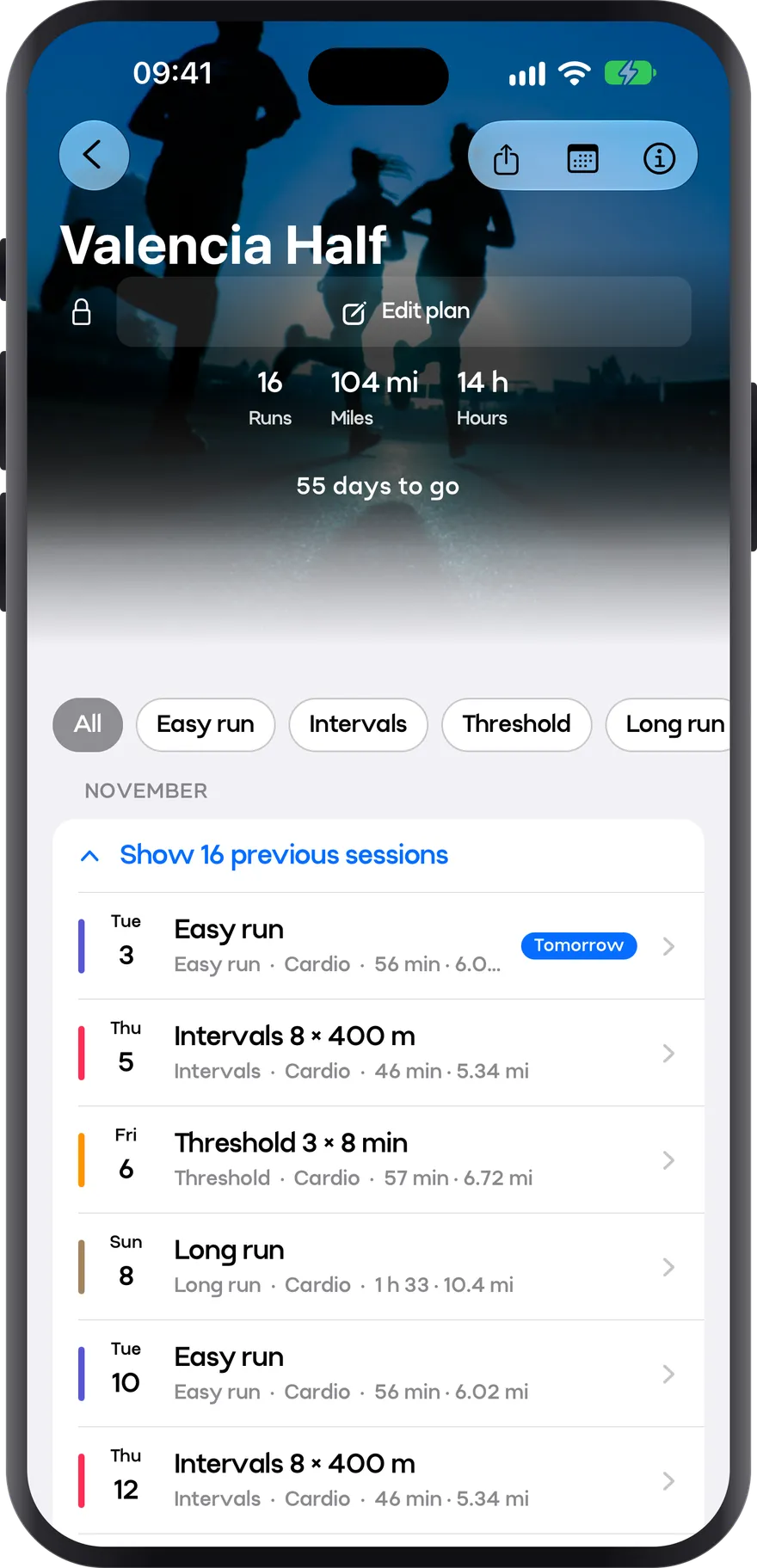
Plan
Your plan to the finish line
Pick the race and the date, and the plan takes you to the start line. Week by week, with paces built for you and the countdown always in view.
- Easy runs, intervals, threshold and long runs, each with its pace
- Countdown to race day
- Runs, miles and hours for the whole plan
- 02
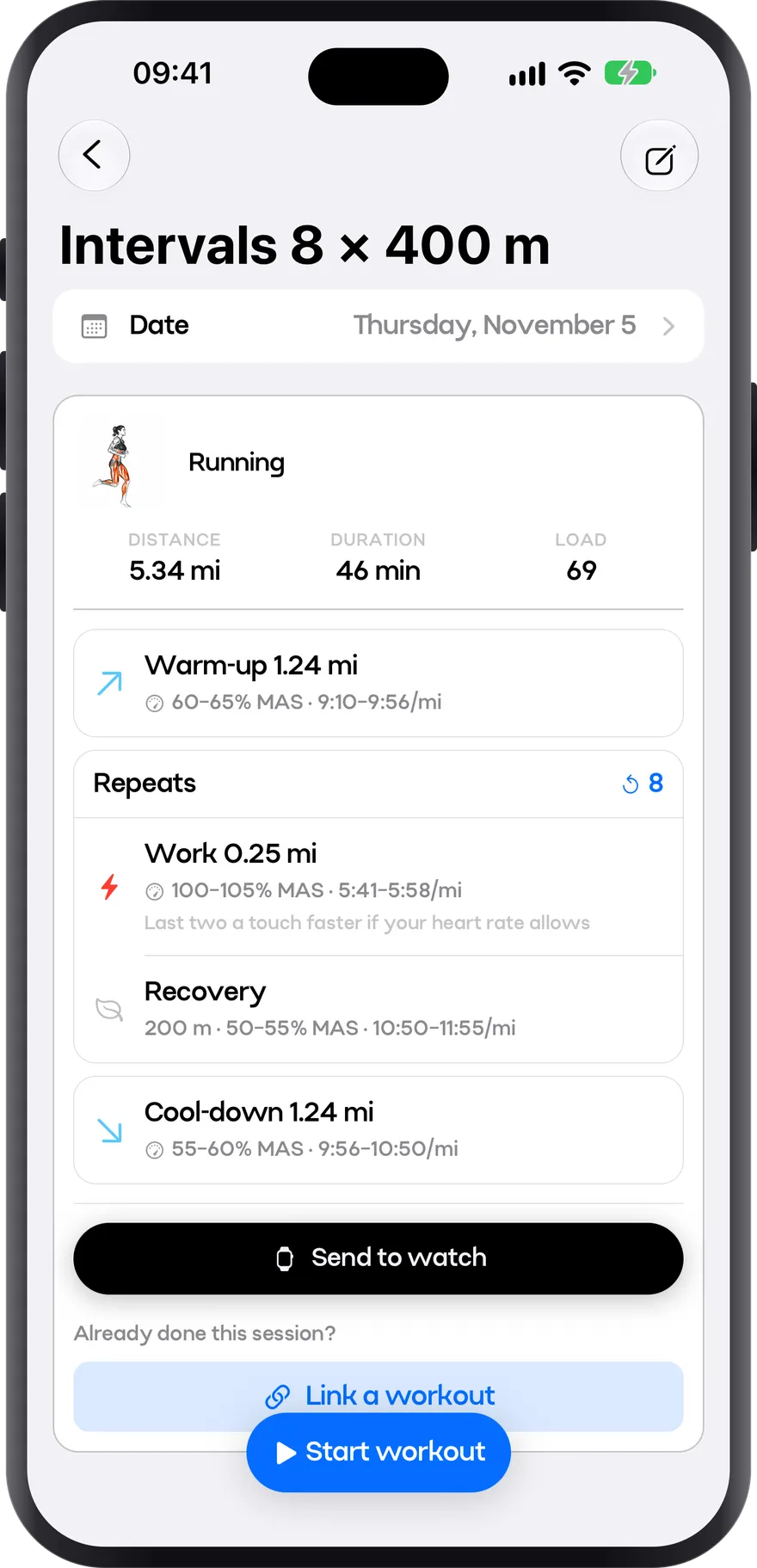
Intervals
Intervals at the right pace
Warm-up, reps and cool-down, each with its pace. It all comes from your MAS, so there’s no guessing how fast to go. Straight to your watch.
- Target pace for every segment, per mile and as % of MAS
- Recoveries and cool-down already worked out
- Sent to your Apple Watch in one tap
- 03
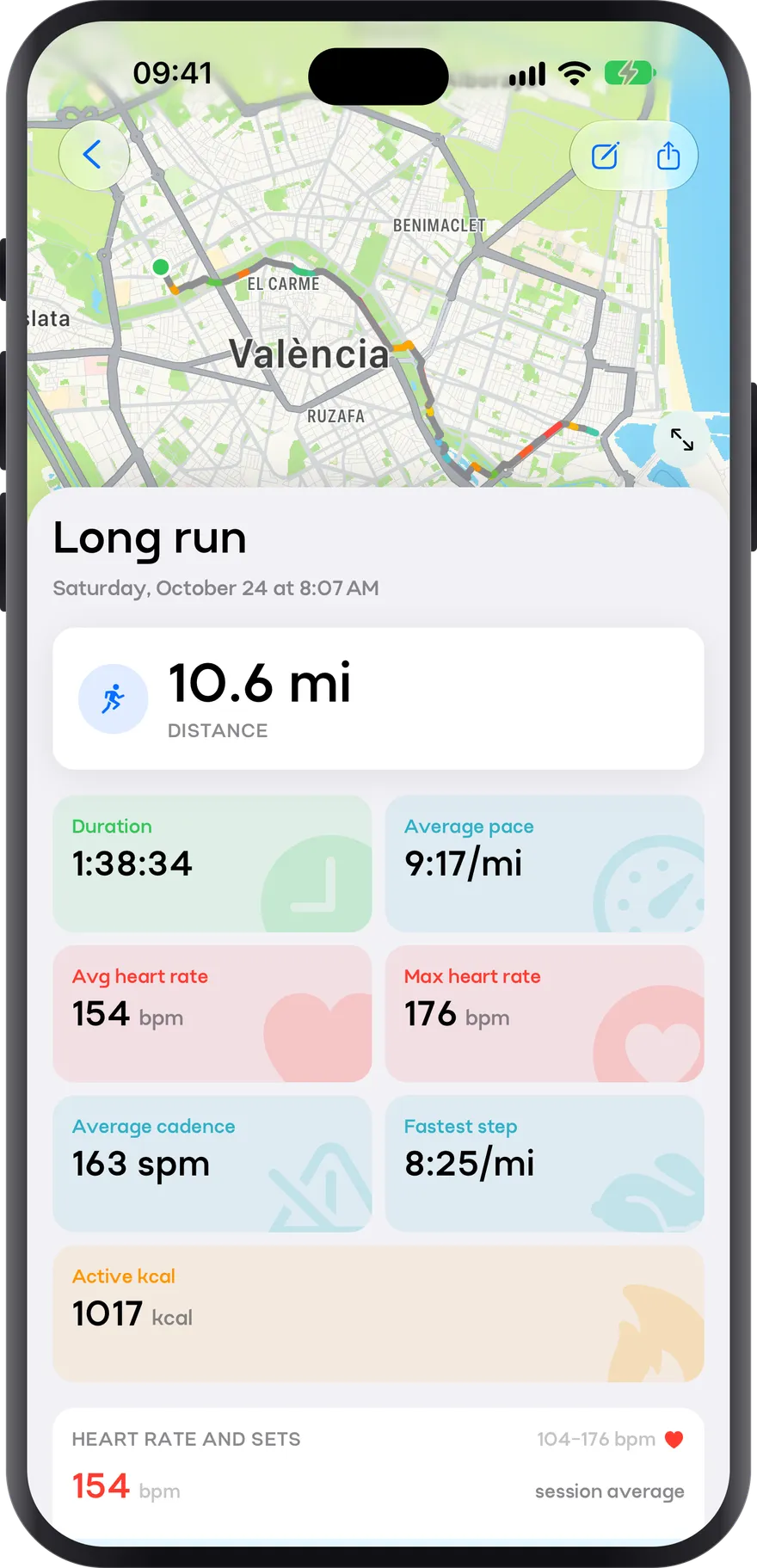
Run
Every mile, measured
When you finish, the whole run at a glance: pace, heart rate and splits, with your route on the map coloured by how fast you were going. From your watch or from Apple Health.
- Route on the map, coloured by pace
- Average pace, average and max heart rate, and cadence
- Fastest split and active calories
How you use it
- 1
Take the test
Six minutes at the fastest pace you can hold, on a track or a flat stretch.
- 2
Check your zones
The app works out the pace of every zone and predicted times for every distance.
- 3
Head out with intervals on your wrist
Send the session to Apple Watch and run without looking at your phone.
- 4
Repeat the test
Every few weeks. The history shows whether your MAS is rising, and your new paces come from it.
Starting to run: your first eight weeks
The walk-run method, how many days, how long, and why the classic beginner mistake is not running slowly but running too soon.
Training zones: measuring effort without kidding yourself
The three-zone model, where 80/20 comes from, how to estimate your threshold with a field test, and why most recreational runners train in a grey zone that achieves nothing.
vVO2 max: the speed that organizes all your training
What maximal aerobic speed is, how to measure it with a six-minute field test, how all your zones and target paces come out of it, and how often to measure it again.
Preparing for a 5K, 10K, half marathon or marathon
What changes in the plan depending on the target distance: block length, key sessions, pacing strategy, and how to taper.
Frequently asked questions
What is MAS and why measure it?
It’s the speed at which you reach your maximal oxygen uptake. Measuring it with a test is more reliable than estimating it from age, and the paces of all your zones come from it.
Do I need an Apple Watch?
No. Zones, paces and logging work from your phone; the watch lets you carry your intervals on your wrist and leave the phone behind.
Is it on Android?
Yes, the app is on Google Play. Sending intervals to a watch is for Apple Watch.
Does it work if I also go to the gym?
Yes. Strength and running live in the same app, and the stats combine both.
Stop running by feel
Take the test, get your zones and head out today with your intervals on your wrist.