
Get to your race with measured paces
Measure your MAS, get the pace of every zone and the predicted time for your distance, and send every interval session to your Apple Watch. With the weeks left until race day always in sight.
- «I have a bib for a 10K, a half or a marathon»
- «I want a new PB and don’t know what pace to do my intervals at»
- «My plan gives me paces and I don’t know if they’re mine»
What happens today
A blind target
Without knowing your real level, your goal time is a wish: you either fall short or blow up halfway.
Intervals at the wrong pace
A generic plan gives someone else’s paces. If they don’t come from your MAS, intervals tire you without training what they’re meant to.
The calendar catches up with you
Without seeing the weeks left, load gets improvised and the taper comes late or not at all.
What the app does
MAS test
Six minutes all-out, Cooper, shuttle run or a race: that gives you the speed that sets everything else.
Predicted times
From 1,500 m to the marathon, from your MAS: a realistic target for your distance.
Intervals on Apple Watch
Every rep with its distance, target pace and recovery, and the warm-up already worked out.
Zones with their pace
Easy runs, threshold and intervals, each at its pace in min/km and % of MAS.
Countdown to race day
The weeks left until the day, in sight from the home screen.
Weekly load
Distance and time compared with the previous period, so you neither overdo it nor fall short.
This is what you'll use every day
No mock-ups and no promises: the real screens of the app, exactly as they look on your phone.
- 01
Plan
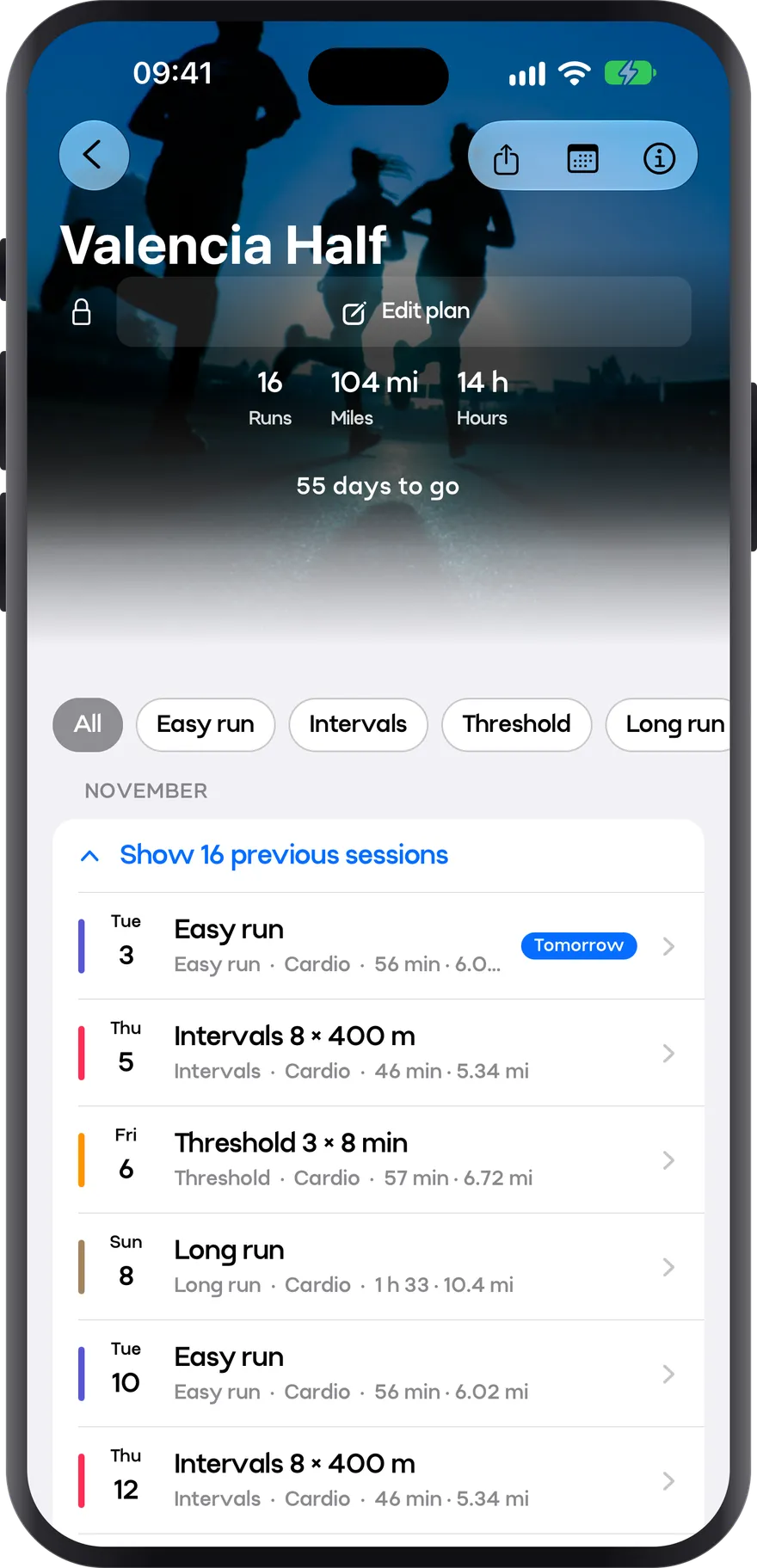
Your plan to the finish line
Pick the race and the date, and the plan takes you to the start line. Week by week, with paces built for you and the countdown always in view.
- Easy runs, intervals, threshold and long runs, each with its pace
- Countdown to race day
- Runs, miles and hours for the whole plan
- 02
Intervals
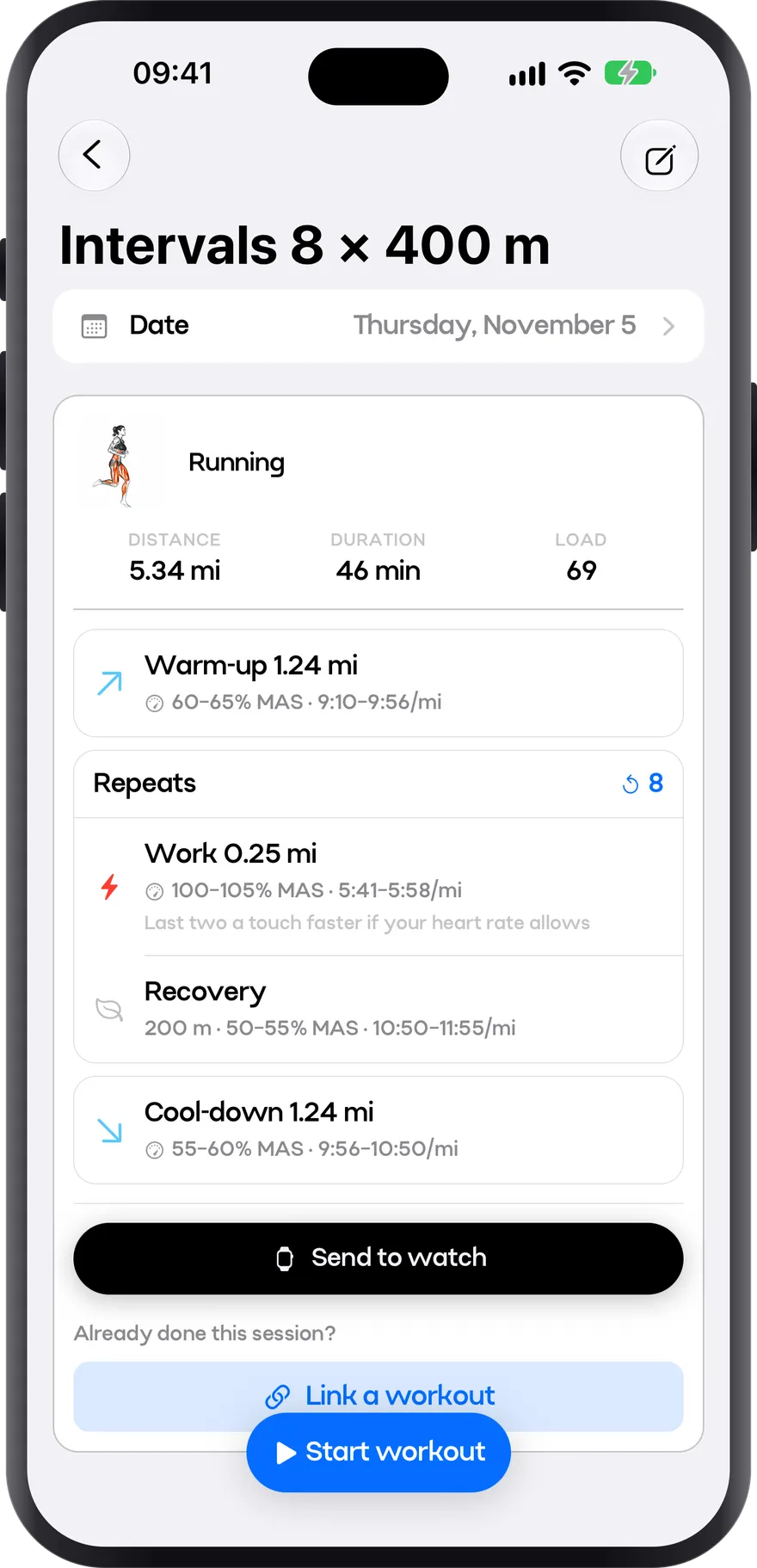
Intervals at the right pace
Warm-up, reps and cool-down, each with its pace. It all comes from your MAS, so there’s no guessing how fast to go. Straight to your watch.
- Target pace for every segment, per mile and as % of MAS
- Recoveries and cool-down already worked out
- Sent to your Apple Watch in one tap
- 03
Run
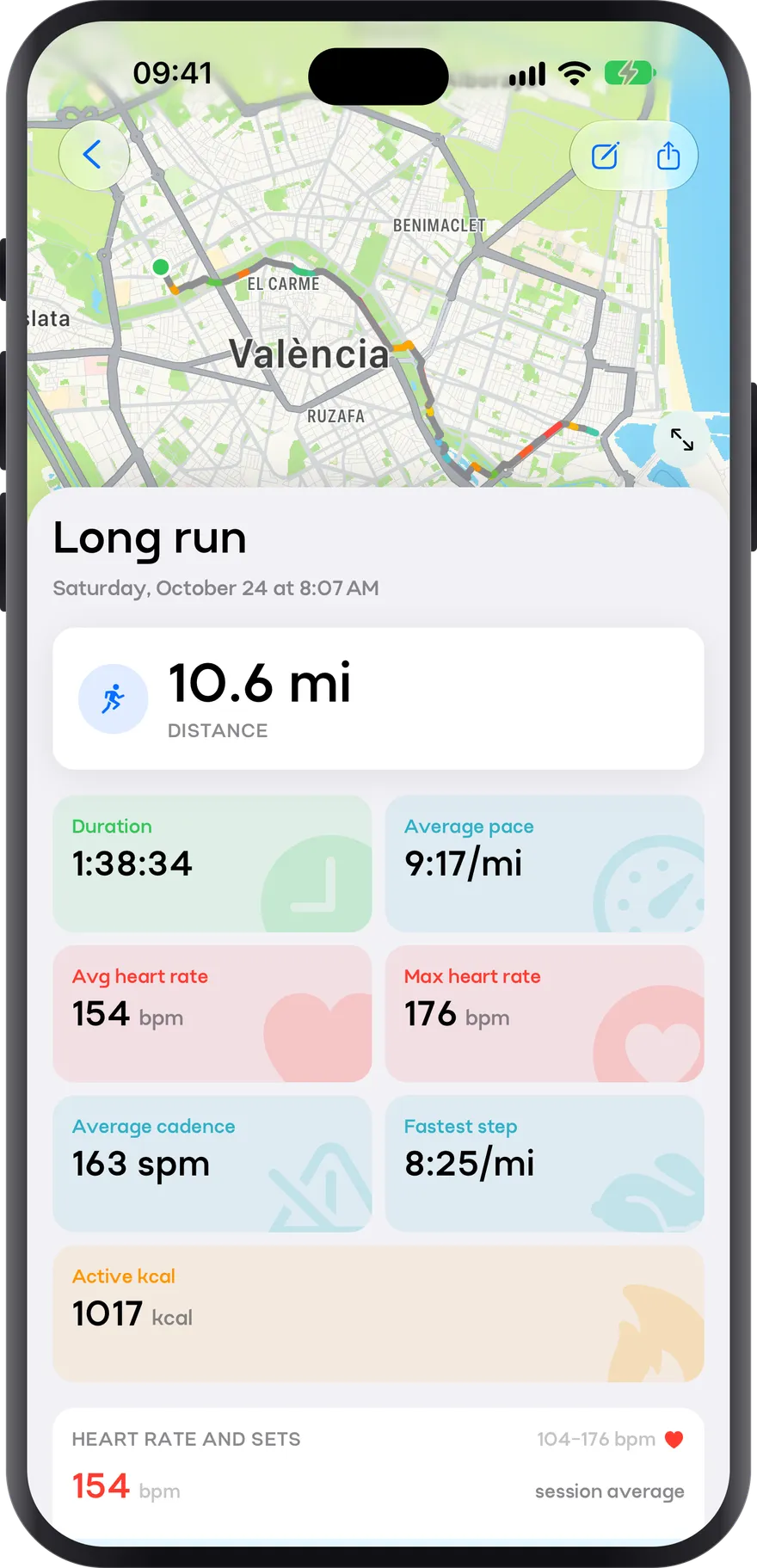
Every mile, measured
When you finish, the whole run at a glance: pace, heart rate and splits, with your route on the map coloured by how fast you were going. From your watch or from Apple Health.
- Route on the map, coloured by pace
- Average pace, average and max heart rate, and cadence
- Fastest split and active calories
How you use it
- 1
Measure your MAS
Take the test at the start of your training block.
- 2
Set a realistic goal
Check the predicted time for your distance and decide what to aim for.
- 3
Train by zones
Every interval at its zone’s pace, sent to Apple Watch.
- 4
Retest before racing
See how much you’ve improved and adjust your race pace.
Preparing for a 5K, 10K, half marathon or marathon
What changes in the plan depending on the target distance: block length, key sessions, pacing strategy, and how to taper.
vVO2 max: the speed that organizes all your training
What maximal aerobic speed is, how to measure it with a six-minute field test, how all your zones and target paces come out of it, and how often to measure it again.
How a running session is written
The anatomy of a session: steps, target, intensity, repetitions and recovery. The rules that decide how long an interval lasts and how much you rest, and how to read the notation you will find in any plan.
Plan your week: volume, progression and down weeks
How much volume, how to split it, how much to add each week, and what the evidence actually says about the famous 10% rule.
Frequently asked questions
How many weeks do I need to train for a marathon?
It depends on where you start, but typical plans run 12-20 weeks on top of an existing running base. The guide covers it distance by distance.
How often should I retest my MAS?
At the start and end of each training block: that way your paces follow your real fitness.
Are predicted times reliable?
They’re an estimate from your MAS, very useful for choosing a goal. On race day the course, the heat and how you arrive also count.
Do I need an Apple Watch?
No. Zones, paces and predicted times work from your phone; the watch lets you carry your intervals on your wrist.
Get to race day with measured paces
Take the test, set your goal and carry every interval on your wrist from today.